Digital computers handle discrete data represented by digits/binary values.
Hybrid computers combine analogue and digital processing.
Question 1(b) — 4 marks
Explain two aspects in computers that have made them develop tremendously.
Model answer
Miniaturisation of electronic hardware: transistors and increasingly dense integrated circuits allow smaller, more powerful, more reliable machines at lower unit cost.
Improved processing and storage capability: faster processors, greater memory capacity and higher-capacity storage allow computers to perform more complex tasks and support a wider range of applications.
Question 1(c) — 4 marks
Distinguish between a Web page and a Web site as used in the Internet.
Model answer
A web page is an individual document/resource displayed by a browser at a particular address.
A website is a related collection of web pages and resources organised under a common site identity/address.
Question 1(d) — 4 marks
Manguti Company incorporated the use of Uninterruptible Power Supply devices in the computer system. Explain two uses of these devices.
Model answer
Temporary backup power: a UPS keeps equipment running briefly during a mains failure, allowing work to be saved and systems shut down safely.
Power conditioning/protection: suitable UPS units suppress surges and regulate or bridge certain supply variations, reducing disruption and equipment damage.
Question 2(a) — 3 marks
Merchy Company intends to connect its computers to the Internet. Outline three ways the company would achieve this.
Model answer
A fixed fibre-optic Internet service through an ISP.
A mobile broadband service using a cellular modem/router.
A satellite Internet service using suitable terminal equipment.
Question 2(b)(i) — 4 marks
Explain two hardware devices in each case that could be used to perform the following tasks in a supermarket: inputting item details into computers.
Model answer
Barcode scanner: reads an item’s barcode and supplies its product identifier to the sales system.
Keyboard: allows an attendant to enter product codes, descriptions or quantities manually.
Question 2(b)(ii) — 4 marks
Explain two hardware devices in each case that could be used to perform the following tasks in a supermarket: displaying the cost of purchased goods.
Model answer
Monitor/customer display: shows the selected items, their prices and the running bill electronically.
Printer: produces a receipt giving a permanent printed record of item costs and the total payable.
Question 2(c) — 4 marks
Distinguish between Min() and Max() as applied in spreadsheet applications.
Model answer
MIN returns the smallest numeric value in the supplied values/range.
MAX returns the largest numeric value in the supplied values/range.
Question 3(a) — 4 marks
Describe each of the following operating systems features:
(i) device management; (2 marks)
(ii) security. (2 marks)
Model answer
Device management controls input/output devices through drivers, allocates access and coordinates their use by applications.
Security protects system resources using identification/authentication, access permissions and related controls.
Question 3(b) — 4 marks
Explain the function of each of the following word-processing menus giving two examples in each case:
(i) editing menu; (2 marks)
(ii) font menu. (2 marks)
Model answer
Editing menu/group supplies commands for manipulating or locating document content; examples are Copy and Find/Replace.
Font menu/group changes the appearance of characters; examples are font typeface and font size (also bold or italic).
Question 3(c) — 3 marks
Joy intends to create slides in a presentation program. Outline three ways she could use to create the slides.
Model answer
Insert new slides and choose their layouts.
Duplicate existing slides and modify the copies.
Import/reuse slides from another presentation.
Question 3(d) — 4 marks
Explain two reasons that may necessitate the use of a bus network topology in a computer network design.
Model answer
Low installation cost for a small simple network: devices share a single backbone and no central switch is required in the traditional bus arrangement.
Reduced cable requirement: connecting devices along a common cable can need less cabling than running a separate connection from every device to a central point.
Question 4(a) — 3 marks
Outline three file organization methods that may be used in computers.
Model answer
Serial organisation.
Sequential organisation.
Direct/random organisation.
Question 4(b) — 6 marks
Explain each of the following elements of data security in computers:
(i) confidentiality; (2 marks)
(ii) availability; (2 marks)
(iii) integrity. (2 marks)
Model answer
Confidentiality ensures data is disclosed only to authorised people or processes.
Availability ensures authorised users can access needed information and services when required.
Integrity protects data from unauthorised or accidental alteration so that it remains complete and correct.
Question 4(c)(i) — 2 marks
Figure 1 shows categories of computer software. Use it to answer the questions that follow. Identify each of the categories labelled I and II.
Model answer
I: System software.
II: Application software.
Question 4(c)(ii) — 4 marks
Explain one function of each of the categories mentioned in (i).
Model answer
System software manages hardware and basic computer resources and provides a platform on which applications run.
Application software performs users’ specific tasks, such as maintaining and querying business records in a database.
Question 5(a) — 3 marks
Outline three options of Table AutoFit feature in a word processing program.
Model answer
AutoFit to Contents.
AutoFit to Window.
Fixed Column Width.
Question 5(b)(i) — 2 marks
Peter has been tasked to proofread a document created using a word processing program. Explain the feature that he could use to perform each of the following: look for the occurrence of the word “Church” and change it to “Company”.
Model answer
Find and Replace searches for Church and substitutes Company. Use Replace to review each occurrence or Replace All after checking that every occurrence should change.
Question 5(b)(ii) — 2 marks
Peter has been tasked to proofread a document created using a word processing program. Explain the feature that he could use to correct misspelt words.
Model answer
Spelling checker identifies suspected spelling errors and offers suggested replacements. Review the suggestions and accept the correct spelling rather than changing valid names blindly.
Question 5(c) — 4 marks
Distinguish between the terms widow and orphan as applied in a word processing document.
Model answer
A widow is a paragraph’s final line left alone at the top of the following page or column.
An orphan is a paragraph’s opening line left alone at the bottom of a page or column, separated from the rest of the paragraph.
Question 5(d) — 4 marks
With the aid of an illustration in each case, describe each of the following vertical alignments of text in a worksheet cell:
(i) Centre; (2 marks)
(ii) Justify. (2 marks)
Model answer
Centre positions the text block halfway between the cell’s top and bottom.
Justify spreads the lines of wrapped text vertically between the top and bottom of the cell.
Question 6(a)(i) — 1 marks
State one function of a router as used in data communication.
Model answer
A router forwards packets between different networks using destination addresses and routing information.
Question 6(a)(ii) — 4 marks
Outline four reasons that would necessitate an organization to connect its computers to a Local Area Network.
Model answer
Share files and data.
Share peripherals such as printers.
Enable communication/collaboration among staff.
Centralise administration, backups and access controls.
Question 6(b)(i) — 2 marks
Figure 2 shows a spreadsheet extract from the books of Upevu Enterprises. Use it to answer the questions that follow. Using a function and cell addresses only, write a formula that would be used to compute total sales for the shirts in cell D2.
A
B
C
D
1
Items
Price Per Item
Items Sold
Total Sales
2
Shirt
1000
18
3
Trousers
2000
30
4
Coat
3000
20
5
Total number of items sold
Figure 2
Model answer
In D2: =PRODUCT(B2:C2)
Step
Working
Result
Multiply shirt price by quantity
1,000 × 18
18,000
Question 6(b)(ii) — 4 marks
Use the Sumif function to compute total number of items sold where the items sold is more than 20 items.
Model answer
=SUMIF(C2:C4,">20",C2:C4)
Items sold
Meets >20?
Included
18
No
0
30
Yes
30
20
No — equal to 20
0
Total
30
Question 6(c) — 4 marks
Distinguish between Slide Sorter View and Slide Show View features in a presentation program.
Model answer
Slide Sorter displays slide thumbnails for organising, copying, deleting or rearranging slides.
Slide Show displays the presentation to an audience, normally full-screen, with its effects, timings and navigation.
November 2022
Paper codes: 2903/103A (shared paper) Time: Not shown in supplied scan Instructions: Not shown in supplied scan
Question 1(a) — 3 marks
Outline three application areas of computers in a hospital environment.
Model answer
Maintaining patient records and appointments.
Processing laboratory or diagnostic results.
Managing pharmacy stock and billing.
Question 1(b) — 4 marks
Explain each of the following types of storage media used in a computer system:
(i) magnetic media;
(ii) optical media.
Model answer
Magnetic media store bits through magnetised regions on a surface, as in a magnetic hard disk or tape.
Optical media store data in an optically readable surface pattern and use a laser for reading/writing, as in CDs or DVDs.
Question 1(c) — 4 marks
Distinguish between auto content wizard and slide design as used in a presentation program.
Model answer
AutoContent Wizard in older presentation software guides the user through creating a presentation with suggested structure and sample content.
Slide design controls visual appearance, such as colours, fonts and background/theme, without providing the same content-planning wizard.
Question 1(d) — 4 marks
Justus intends to print a word processing document. Outline four print options he could set in the print dialog box.
Model answer
Printer to use.
Page range.
Number of copies.
One-sided or two-sided printing, where supported.
Question 2(a) — 3 marks
Outline three items that could be displayed on the title bar of a word processing program window.
Model answer
Document/file name.
Application name.
Window control buttons such as minimise, maximise/restore and close.
Question 2(b) — 4 marks
Distinguish between a dedicated computer and a general-purpose computer.
Model answer
A dedicated computer is assigned or designed for one particular task, such as controlling a specific machine.
A general-purpose computer can perform many different tasks by running different programs, such as word processing and accounting.
Question 2(c) — 4 marks
The management of XYZ college received a system audit report indicating that their information system requires protection from malware. Explain two examples of malware that the system should be protected from.
Model answer
Virus: malicious code that attaches to a host program/file and spreads when the infected host is executed, potentially corrupting data.
Worm: a self-replicating program that spreads between computers, commonly through network vulnerabilities, without needing to attach itself to a host file.
Question 2(d)(i) — 2 marks
Figure 1 is a spreadsheet extract showing examination results for a class. Use it to answer the questions that follow. Using a function and cell addresses only, write a formula that was used in the spreadsheet to compute the total for Kennedy.
A
B
C
D
E
1
EXAM RESULTS
2
STUDENT’S NAME
CAT 1
CAT2
CAT3
TOTAL
COMMENT
3
Pauline
15
10
49
74
Fail
4
Kennedy
13
16
48
77
Fail
5
Sheila
14
14
53
81
Pass
Figure 1. The five column-letter headings over six data columns are reproduced from the scan.
Model answer
The printed column headings are misaligned. For usable spreadsheet formulas, treat the six data columns in order as A: name, B: CAT1, C: CAT2, D: CAT3, E: TOTAL, F: COMMENT. The figures themselves are unchanged.
In E4: =SUM(B4:D4)
Working
Total
13 + 16 + 48
77
Question 2(d)(ii) — 2 marks
Using a function and cell addresses only, write a formula that was used in the spreadsheet to insert the comment “Pass” for Sheila if the TOTAL exceeded 80, otherwise “Fail”.
Model answer
Use the six-column reference convention explained above.
In F5: =IF(E5>80,"Pass","Fail")
Test
Result
Displayed comment
81 > 80
TRUE
Pass
Question 3(a) — 3 marks
Outline the function of each of the following utility programs in a computer system:
(i) disk defragmenter;
(ii) disk clean-up;
(iii) file management.
Model answer
Disk defragmenter rearranges fragmented file blocks on a magnetic disk into more contiguous locations to reduce mechanical seeking. It is not a routine requirement for SSDs.
Disk clean-up removes unnecessary files, such as temporary files, to free storage space.
File management provides operations for organising files and folders, including copying, moving, renaming and deleting.
Question 3(b) — 2 marks
Peter entered value 25 in cell A1 in a spreadsheet program. Write a formula that could be used to increase this value by 20%.
Model answer
In another cell: =A1*(1+20%)
Step
Working
Result
Increase
25 × 0.20
5
New value
25 + 5
30
Question 3(c) — 6 marks
With the aid of an example in each case, describe the function of the following categories of computer keyboard keys:
(i) Function keys;
(ii) Navigation keys.
Model answer
Function keys invoke commands defined by an application or system; for example F1 commonly opens Help. Their exact action can depend on software and keyboard settings.
Navigation keys move the insertion point or selection through content; for example the Right Arrow moves one position to the right and Home commonly moves to the start of a line.
Question 3(d) — 4 marks
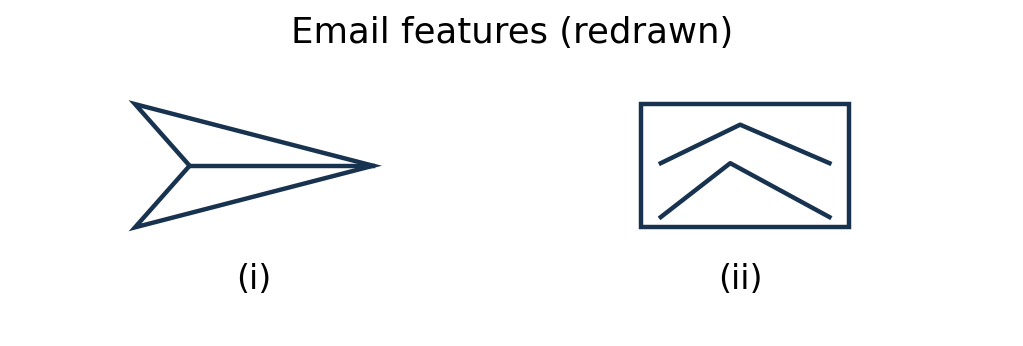
Explain the function of each of the following email features.
Model answer
(i) Send: the paper-plane icon submits the composed message for delivery to its recipients.
(ii) Insert picture: adds an image to the email message body.
Question 4(a) — 3 marks
The following functions are used in a spreadsheet program: AND, Average, OR, TRUE, IF, AverageIF. Classify them as either Statistical or Logical functions.
Model answer
Statistical
Logical
AVERAGE, AVERAGEIF
AND, OR, TRUE, IF
Question 4(b) — 4 marks
Describe each of the following data processing modes used in computer systems:
(i) Real time;
(ii) Time sharing.
Model answer
Real-time processing produces a response within the deadline needed by the operation being monitored or controlled.
Time sharing allocates short processor-time intervals among multiple users/tasks, giving each frequent access to the computer.
Question 4(c) — 4 marks
Right clicking while pointing to a folder provides various operation options that could be performed on the folder. Outline four such operations.
Model answer
Open.
Copy.
Rename.
Delete.
Question 4(d) — 4 marks
Some Technical colleges have embraced online learning. Explain two challenges the students are likely to face from using this mode of learning.
Model answer
Connectivity and cost: weak Internet coverage or unaffordable data can interrupt classes and prevent downloading materials.
Limited suitable equipment or power: lack of a reliable device/electricity can restrict participation and completion of online tasks.
Question 5(a) — 2 marks
State two differences between a workbook and a worksheet as used in a spreadsheet program.
Model answer
A workbook is the spreadsheet file/container; a worksheet is an individual tabbed grid within it.
One workbook can contain several worksheets; each worksheet contains its own rows, columns and cells for data and calculations.
Question 5(b) — 5 marks
A microfinance company intends to computerize its operations. Outline five computer devices that the company requires to relay the output from computer transactions.
Model answer
Monitor.
Receipt/document printer.
Projector.
Speakers for audio output.
Plotter for large-format graphical output where required.
Question 5(c) — 4 marks
Salome, a data entry clerk, complained of body aches and pains. Outline four possible work-related causes that may have led to the pains.
Model answer
Poor sitting posture.
A poorly adjusted chair or desk.
Prolonged work without breaks or changes of position.
Repetitive keyboard/mouse work with unsuitable wrist or arm positioning.
Question 5(d) — 4 marks
A college intends to improve its operations by connecting all their computers. Outline four benefits the college will gain from this move.
Model answer
Sharing files and learning resources.
Sharing printers and other peripherals.
Faster communication and collaboration.
Centralised backup and management of users/resources.
Question 6(a) — 2 marks
Outline two ways of changing the column width in a spreadsheet worksheet.
Model answer
Drag the boundary on the right of the column heading.
Use the Column Width command and enter a width (or use AutoFit to fit contents).
Question 6(b) — 4 marks
A company intends to acquire application software to support their operations. Outline four factors, other than cost, they should consider when selecting the software.
Model answer
Fit to required functions.
Compatibility with existing hardware, operating systems and data formats.
Ease of use and staff training requirements.
Vendor support, maintenance and upgrade arrangements.
Question 6(c) — 3 marks
Table 1 shows the details of a table to be designed in a database to store records of employees. State six field properties that could be set for this field.
Field Name
Data Type
Field Properties
EmployeeName
Text
Table 1
Model answer
Field Size.
Format.
Input Mask.
Caption.
Default Value.
Validation Rule.
Question 6(d)(i) — 2 marks
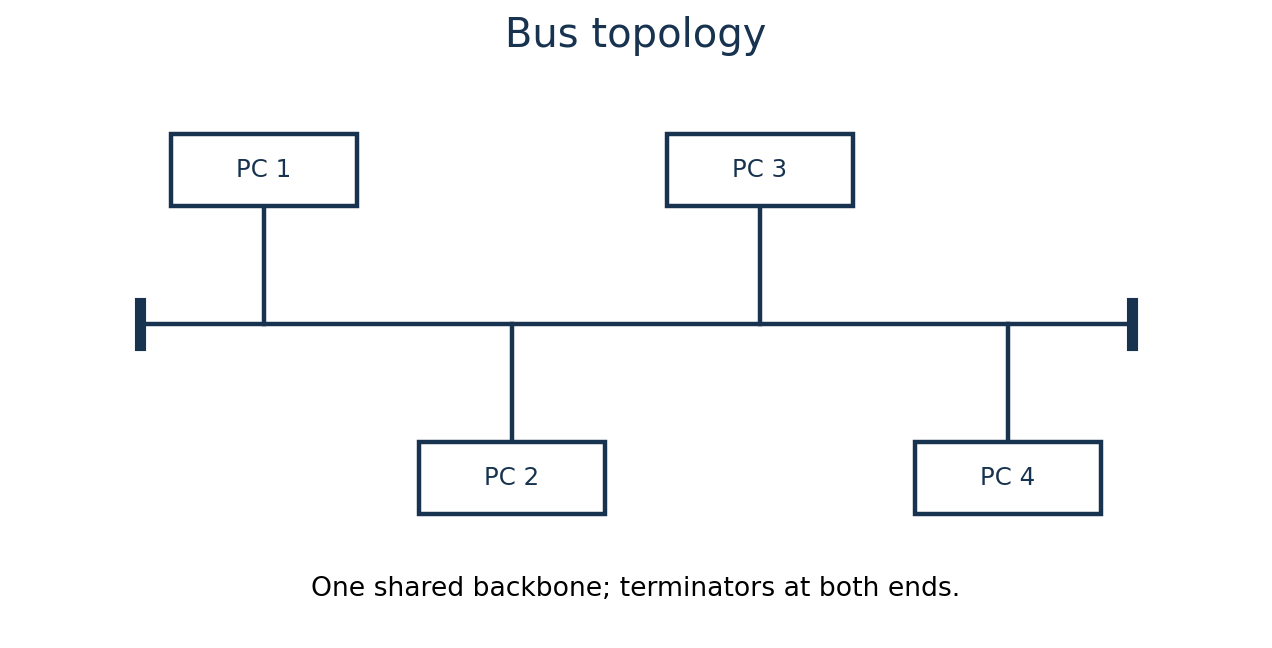
Figure 2 shows a type of networking topology used to design a computer network. Use it to answer the questions that follow. Describe this type of network topology.
Model answer
This is a bus topology. All devices attach to a shared backbone cable; in a traditional coaxial bus the two ends are terminated to prevent signal reflection.
Question 6(d)(ii) — 4 marks
Outline four advantages of this topology.
Model answer
Requires relatively little cabling for a small network.
Does not require a central hub/switch in the traditional bus design.
Can be inexpensive to install for a small number of nearby devices.
Failure of an individual computer need not stop other devices, provided its connection and the backbone remain intact.
Finish Course Early?
You have not completed all required lessons and assessments.
Your Progress
0%
Select the fields to be shown. Others will be hidden. Drag and drop to rearrange the order.