Information Communication Technology (Theory) — 2021
KNEC Diploma in Supply Chain Management, Module I. Original examination questions with explained model answers for revision.
July 2021
Paper codes: 2903/103A (shared paper) Time: Not shown in supplied scan Instructions: Not shown in supplied scan
Question 1(a) — 2 marks
Outline two roles of computers in business.
Model answer
Processing business transactions and accounts.
Storing and retrieving business records for decision-making.
Question 1(b) — 4 marks
Explain two features of a database.
Model answer
Structured storage: related data is organised into defined fields, records and tables, making information consistent and manageable.
Relationships and controlled retrieval: keys link related records and queries retrieve selected information without separately duplicating every item of data.
Question 1(c) — 3 marks
Maria, a company’s secretary was instructed to write a letter to be sent to many recipients. Describe the word processor feature she would use.
Model answer
Mail merge combines one main letter with a data source containing recipient details. Merge fields such as Name and Address are replaced by the corresponding details to produce an individually addressed letter for each recipient.
Question 1(d) — 6 marks
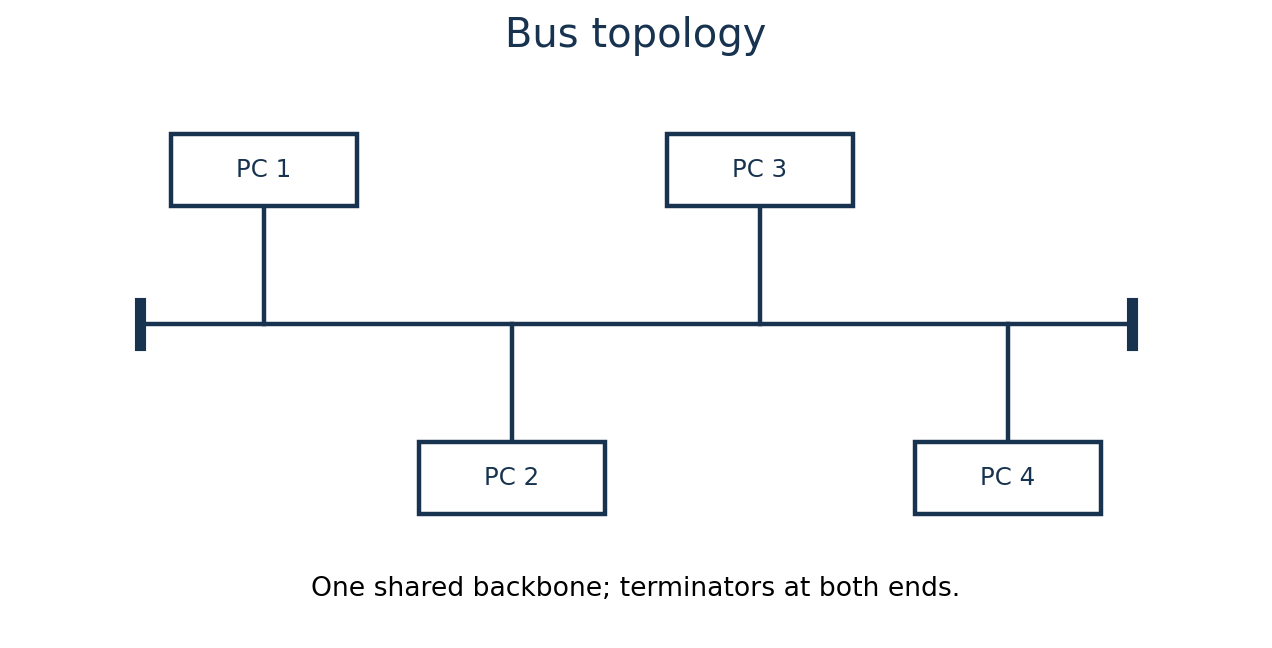
Using diagrams in each case, describe the following LAN topologies:
(i) bus;
(ii) star.
Model answer
Bus: all devices connect to one shared backbone cable. Traditional coaxial bus networks have terminators at both ends.
Star: every device has a separate connection to a central hub/switch, through which its network communication passes.
Question 2(a) — 4 marks
Explain the functions of the following components of a CPU:
(i) control unit;
(ii) arithmetic logic unit.
Model answer
Control unit: fetches and decodes instructions and issues control signals to coordinate execution and data movement.
Arithmetic logic unit: carries out arithmetic calculations and logical/comparison operations on data.
Question 2(b) — 4 marks
Differentiate between single clicking and right clicking mouse operations.
Model answer
Single clicking normally means pressing and releasing the primary mouse button once to select an object or activate a control.
Right clicking uses the secondary button, normally to open a context menu containing commands relevant to the selected object.
Question 2(c) — 4 marks
Alice used cell references while performing calculation in a spreadsheet program. Describe two such references she could have used.
Model answer
Relative reference changes according to the destination when copied; A1 copied one row down becomes A2.
Absolute reference fixes both row and column with dollar signs; $A$1 stays $A$1 when its formula is copied.
Question 2(d) — 3 marks
During an ICT lesson, a student was required to insert a chart in a worksheet. Outline three types of charts that the student is likely to use.
Model answer
Column/bar chart.
Line chart.
Pie chart.
Question 3(a) — 3 marks
Outline three types of file access methods.
Model answer
Sequential access.
Direct/random access.
Indexed access.
Question 3(b) — 6 marks
Jantech Company has been communicating with its clients via email. Explain three benefits that the company has accrued from this move.
Model answer
Fast delivery: messages reach distant clients quickly, reducing delays in enquiries and orders.
Low marginal cost: many messages can be sent without postage or repeated telephone charges, using the existing connection.
Useful records and attachments: correspondence can be stored/searched and documents such as quotations sent with the message.
Question 3(c) — 2 marks
A computer technician was asked to install system software in a new computer. Outline two types of such software he is expected to install.
value_if_true is returned when the condition is true.
value_if_false is returned when the condition is false.
Question 4(c) — 4 marks
Differentiate between formulae and function as used in spreadsheet.
Model answer
A formula is an expression written to calculate a result, such as =B2*C2.
A function is a predefined named calculation used within a formula, such as SUM in =SUM(B2:B5).
Question 4(d) — 4 marks
A student has been using folders to store his work during practical lessons. Explain two reasons that could have led to this action.
Model answer
Organisation: related files can be grouped by subject/project instead of being scattered in one location.
Easier management and retrieval: meaningful folders make files easier to find, copy, move and back up as a group.
Question 5(a) — 3 marks
Outline three presentation views found in a presentation program.
Model answer
Normal view.
Slide Sorter view.
Slide Show view.
Question 5(b) — 4 marks
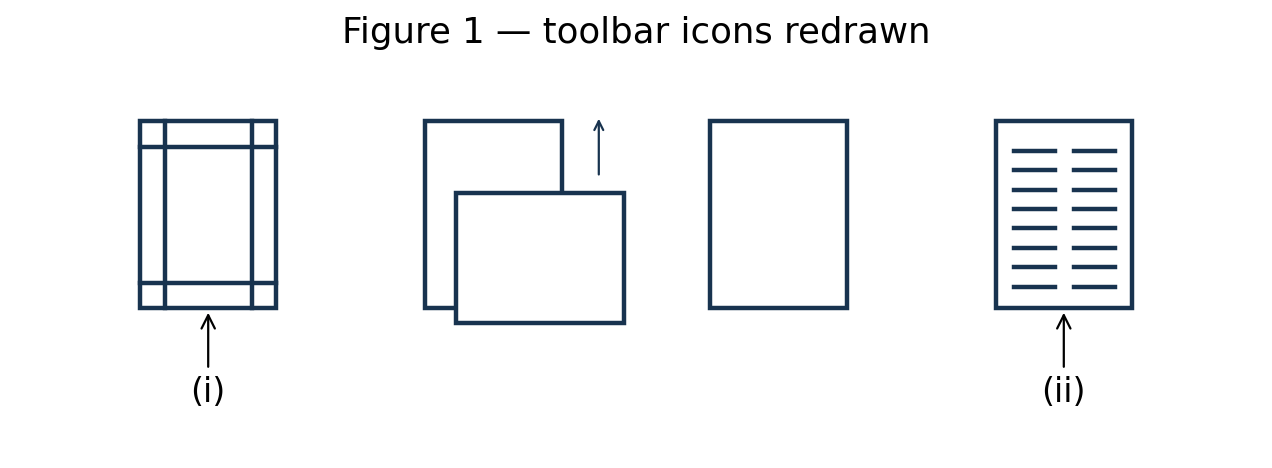
Figure 1 show a section of a tool bar in a word processing program. Explain the function of the features labelled (i) and (ii).
Model answer
(i) Margins: sets the blank space between document text and the edges of the page.
(ii) Columns: arranges document text into two or more vertical columns, allowing text to flow between them.
Question 5(c) — 4 marks
During an ICT lesson, a lecturer opted to use slides to make a presentation. Explain two reasons for his choice.
Model answer
Clear visual explanation: text, pictures, charts and media help illustrate concepts for the class.
Controlled sequence and reuse: slides organise the topic in a planned order and can be edited and reused for later lessons.
Question 5(d) — 4 marks
James, a programmer, has developed a tailor-made software for Maji Technical College. Explain two challenges that the software will pose to the College.
Model answer
Development and maintenance cost: custom software may require substantial funding for design, testing, correction and future changes.
Dependence on specialised expertise: if James is unavailable or documentation is weak, support and upgrades may be difficult.
Question 6(a) — 3 marks
Outline three paragraph alignments used in a word processor.
Model answer
Left alignment.
Centre alignment.
Justified alignment (right alignment is another valid example).
Question 6(b) — 6 marks
A network administrator at Zushi Company intends to secure the company’s network. Explain three benefits the company will accrue from this move.
Model answer
Confidentiality: access controls and secure communication reduce unauthorised disclosure of company information.
Integrity: protection against unauthorised changes helps preserve reliable business records.
Availability: controls against malware and disruption help keep network services accessible to authorised staff.
Question 6(c) — 4 marks
Differentiate between text and memo data types in databases.
Model answer
Text/Short Text stores relatively short character strings, such as a name or code, commonly up to 255 characters in Access.
Memo/Long Text stores longer narrative entries such as detailed notes; its storage limit and formatting features depend on the database version.
Question 6(d) — 2 marks
Dashtech Company management opted to use the internet to market its products. Outline two challenges the company could face from using this approach.
Model answer
Reaching customers with limited Internet access or low digital literacy.
Strong online competition and the cost/effort of making its products visible.
November 2021
Paper codes: 2903/103A (shared paper) Time: Not shown in supplied scan Instructions: Not shown in supplied scan
Question 1(a) — 3 marks
State three features that were introduced in the 3rd generation computers.
Model answer
Integrated circuits replaced assemblies of separate transistors.
Operating systems supported multiprogramming/time sharing more extensively.
Keyboards and monitors became common interactive input/output facilities.
Question 1(b) — 4 marks
Explain two ways in which an organization would use information communication technology to communicate to its customers.
Model answer
Email: send quotations, invoices and replies directly to customers, including supporting documents.
A website/customer portal: publish product information and provide enquiry forms or online support for customers.
Question 1(c) — 4 marks
A company intends to acquire a printer for their daily use. Outline four criteria that they should consider during the selection of this device.
Model answer
Required print quality/resolution.
Printing speed and monthly duty volume.
Total ownership cost, including consumables.
Compatibility, connectivity and support.
Question 1(d) — 4 marks
Dennis has been tasked with creating a document using a presentation program. State eight slide layouts he could use.
Model answer
Title Slide.
Title and Content.
Section Header.
Two Content.
Comparison.
Title Only.
Blank.
Content with Caption.
Question 2(a)(i) — 2 marks
Hong Che Company intends to control access to files in their computer systems using authentication method. Explain the term authentication.
Model answer
Authentication is the process of verifying that a user or device is the identity it claims to be before access is granted.
Question 2(a)(ii) — 4 marks
Explain two ways the organization could implement this method.
Model answer
Passwords/PINs: require a secret associated with a named user account and verify it before sign-in.
Biometrics: compare a captured characteristic, such as a fingerprint, with an enrolled reference to verify the user.
Question 2(b) — 6 marks
State the category of computer software that performs each of the following tasks in a computer system, giving an example in each case:
(i) controlling the working of peripheral devices;
(ii) analyzes, configures, secures, optimizes and maintain the system;
(iii) allows users to accomplish one or more tasks;
(iv) used to create, debug, maintain, or otherwise support other programs and applications.
Model answer
Part
Category
Example
i
Device driver
Printer driver
ii
Utility software
Antivirus utility
iii
Application software
Word processor
iv
Programming/development software
Compiler or debugger
Question 2(c) — 3 marks
Outline three differences between magnetic and optic storage media as used in computer systems.
Model answer
Magnetic media
Optical media
Use magnetised regions to represent bits
Use optically readable marks/surface patterns
Read/write using magnetic heads
Read/write using a laser
Examples: magnetic hard disks and tapes
Examples: CDs, DVDs and Blu-ray discs
Question 3(a) — 3 marks
State six functions of the computer operating system.
Model answer
Process/processor management.
Memory management.
File management.
Device/input-output management.
User interface provision.
Security and access management.
Question 3(b) — 4 marks
Explain each of the following terms as used in the Internet:
(i) domain;
(ii) hypertext link.
Model answer
Domain: a named part of the hierarchical Domain Name System, such as example.com, used to identify online resources/services.
Hypertext link: a selectable reference in a page or document that leads to another resource or location when activated.
Question 3(c) — 4 marks
Figure 1 shows features in a database program. Use it to answer the question that follows. Explain the function of the features labelled (i) and (ii).
Model answer
(i) Relationships: displays and defines relationships between database tables, including linking matching key fields and setting referential-integrity options.
(ii) Linked Table Manager: manages links to external data tables, allowing their source connections to be reviewed or refreshed when the external location changes.
Question 3(d) — 4 marks
Joan has been tasked with the design of a Local Area Network for JuanHo Company. Outline four types of network topologies he is likely to implement.
Model answer
Star.
Bus.
Ring.
Tree.
Question 4(a) — 3 marks
State six data processing modes that may be used in computer systems.
Model answer
Batch processing.
Real-time processing.
Online/interactive processing.
Time sharing.
Multiprocessing.
Distributed processing.
Question 4(b) — 4 marks
Explain one circumstance that would necessitate the use of each of the following view features in a presentation program:
(i) slide sorter;
(ii) slide master.
Model answer
Slide sorter: when the presenter needs to review the whole sequence and rearrange several slides.
Slide master: when the presenter needs to apply a consistent logo, font or layout to all slides using the relevant master/layout.
Question 4(c) — 4 marks
James intends to use the mail merge feature to send customized letters to his clients. Explain two documents he should prepare to achieve this.
Model answer
Main document: contains the common letter text and merge-field placeholders for variable details.
Data source: contains the recipients’ records, with fields such as name and postal address used to fill the placeholders.
Question 4(d) — 4 marks
Distinguish between Autofill and AutoFormat features as used in spreadsheet applications.
Model answer
AutoFill copies data/formulas or extends recognised sequences into adjacent cells, adjusting relative references where appropriate.
AutoFormat applies a predefined combination of formatting, such as fonts, borders and number styles, to a selected range.
Question 5(a) — 3 marks
Outline three ways that may be used to format the page background of a document created using a word processing application.
Model answer
Apply a page colour/fill.
Insert a watermark.
Apply a page border.
Question 5(b) — 4 marks
Explain two reasons for using the print preview feature in a word processing application.
Model answer
Check the final page layout, including margins, page breaks and placement of text/images, before printing.
Detect missing, overflowing or unwanted content and correct it before wasting paper and ink.
Question 5(c) — 4 marks
Figure 2 is a spreadsheet extract showing the status of goods supplied and action to be taken by a wholesaler. Use it to answer the question that follows. Use the If function to write a formula in cell C3 that would display the text “No Action” if the delivery status of the Apples is delivered or, the text “Action to be taken” if delivery status is otherwise.
A
B
C
1
Product
Delivery Status
Action Required
2
Bananas
Delivered
3
Apples
In-transit
4
Oranges
Delivered
5
Figure 2
Model answer
In C3: =IF(B3="Delivered","No Action","Action to be taken")
Condition
Actual value
Result
B3 = “Delivered”
In-transit
FALSE → Action to be taken
Question 5(d) — 4 marks
Karol opted to use templates when creating a document in a presentation program. Explain two advantages he would get by using this feature.
Model answer
Saves preparation time because slide layouts and design elements are already available.
Promotes a consistent professional appearance through coordinated fonts, colours and layouts.
Question 6(a) — 3 marks
Describe a personal area computer network (PAN) giving two examples of technologies that could be used for its connectivity.
Model answer
A PAN connects a person’s devices over a short range around that individual, for example a phone with a laptop or headset.
Bluetooth can provide wireless PAN connections.
USB can provide wired connections between personal devices.
Question 6(b)(i) — 2 marks
Explain each of the following commands as used in presentation programs: hide slides.
Model answer
Hide Slide keeps the slide in the presentation file but skips it during the normal slide-show sequence; it can be unhidden or visited deliberately.
Question 6(b)(ii) — 2 marks
Explain each of the following commands as used in presentation programs: delete slides.
Model answer
Delete Slide removes the selected slide from the presentation rather than merely omitting it from the show.
Question 6(c) — 4 marks
Allan prepared teaching notes on the topic file access methods. Explain two methods he could have included in the notes.
Model answer
Sequential access reads records in their stored sequence, passing earlier records to reach a later one.
Direct/random access locates the required record using an address/key without reading all preceding records.
Question 6(d) — 4 marks
John has been tasked with preparing a data backup plan for an organization. Explain two components that he should include in this plan.
Model answer
Backup scope and schedule: identify the data/systems to protect, the full/incremental backup method and how frequently backups must run to limit possible data loss.
Storage and recovery arrangements: specify secure backup locations, retention periods, responsible staff and tested restoration procedures so usable data can be recovered after a failure.
Finish Course Early?
You have not completed all required lessons and assessments.
Your Progress
0%
Select the fields to be shown. Others will be hidden. Drag and drop to rearrange the order.