Information Communication Technology Theory — March/April 2024
KNEC Diploma in Sales and Marketing — Module I. Paper code: 2902/103A
Independent worked revision answers. These are not official KNEC marking schemes.
Question 1(a)
Outline three ways a computer mouse may be used while creating a document in a word processor. (3 marks)
Answer
- Positioning the insertion point where text is to be entered or edited.
- Selecting text, objects or a range of content.
- Choosing commands, tools or menu items by clicking.
Question 1(b)
State one difference between the third-generation computers and fourth generation computers in reference to each of the following: (i) electronic circuit; (ii) computer memory. (4 marks)
Answer
| Feature | Third generation | Fourth generation |
|---|---|---|
| Electronic circuit | Integrated circuits replaced separate transistors in major circuits. | Large-scale and very-large-scale integration enabled microprocessors on chips. |
| Computer memory | Magnetic-core memory was characteristic of many systems. | Semiconductor chip memory became standard. |
These are the conventional historical comparisons; particular technologies overlapped during the transitions.
Question 1(c)
Joy intends to send a message to her classmate using an email program. Outline four parts of the email that she should fill. (4 marks)
Answer
- From: the sender’s email account, often supplied automatically by the program.
- To: the classmate’s destination email address.
- Subject: a brief description of the message.
- Message body: the actual information Joy wishes to communicate.
Question 1(d)
Linda intends to use section breaks in a document created using a word processing program. Outline four types of such breaks she could use. (4 marks)
Answer
- Next Page.
- Continuous.
- Even Page.
- Odd Page.
Question 2(a)
Outline two functions of the Name Box feature in a spreadsheet program. (2 marks)
Answer
- Displays the address or defined name of the active cell or selected range.
- Allows the user to select a cell or range by entering its address or defined name; it can also be used to assign a range name.
Question 2(b)
Explain a circumstance that would necessitate the use of each of the following types of computers: (i) analog computers; (ii) hybrid computers. (4 marks)
Answer
- Analog computer: where continuously varying physical quantities must be represented and processed directly, for example in an analog process-control or simulation system.
- Hybrid computer: where continuous measurement must be combined with digital computation or control, for example a system that acquires analog sensor readings and converts them for digital analysis.
Question 2(c)
Maxfar Company installed an email program to use in their office computers. Outline three advantages the company would gain from the use of this program. (3 marks)
Answer
- Fast delivery of messages to local and distant recipients.
- Low incremental cost of sending routine correspondence and attachments.
- A searchable written record that can be organised, forwarded and retrieved.
Question 2(d)
With the aid of a diagram, outline the four phases of data processing. (6 marks)
Answer
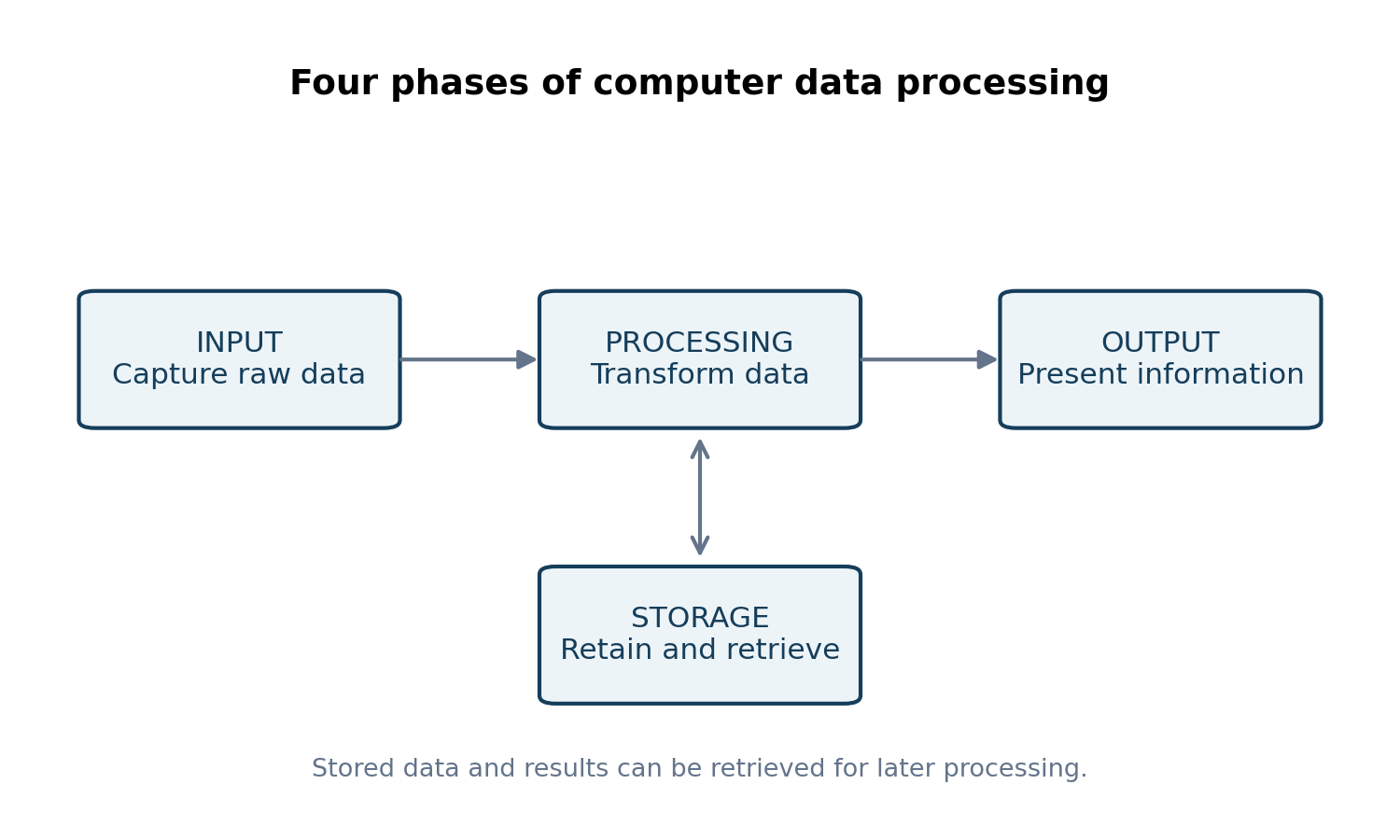
- Input: capture and enter raw data into the system.
- Processing: manipulate data through calculations, comparisons, sorting or other operations.
- Output: present the resulting information in a useful form, such as a report.
- Storage: retain data and results for retrieval, reuse and future processing.
Question 3(a)
State four types of slide masters that could be used when creating slides in a presentation program. (2 marks)
Answer
- Slide master.
- Title master.
- Handout master.
- Notes master.
Title master is legacy terminology. Modern PowerPoint commonly uses a Title Slide layout under a slide master; the question’s four-item terminology includes the older title-master concept.
Reference: Microsoft — Master object.
Question 3(b)
An ICT technician was tasked to acquire flat panel monitors for use in an organisation. Outline six advantages the organisation would gain from using this type of monitors. (6 marks)
Answer
- Occupy less desk space because they are thin and compact.
- Generally consume less power than comparable CRT monitors.
- Produce less heat under comparable operating conditions.
- Are lighter and easier to move or mount.
- Provide a sharp image at their native resolution.
- Generally produce less visible flicker than older CRT displays.
Question 3(c)(i)
With the aid of a diagram, describe a ring network topology as used in computer networking. (4 marks)
Answer
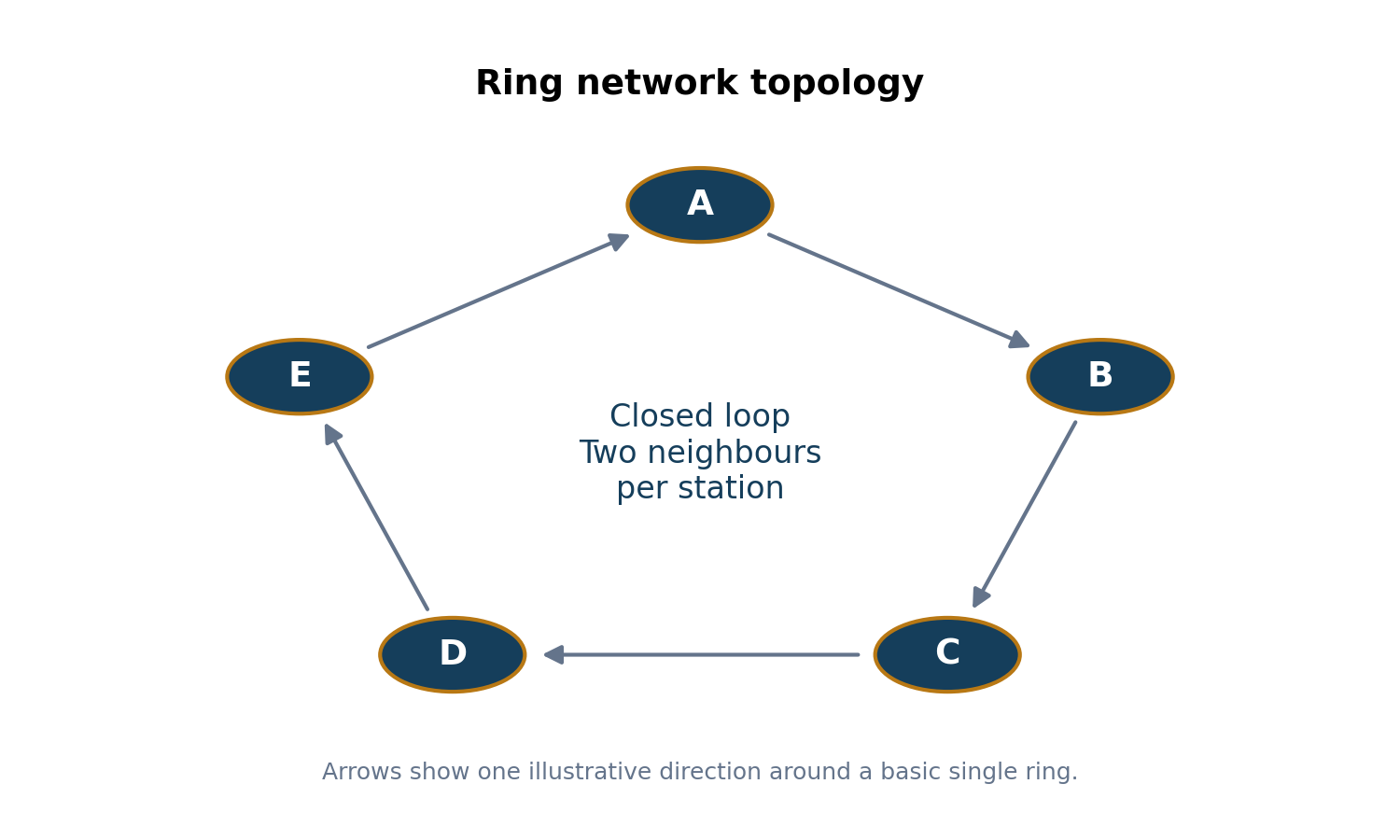
Each station is connected to two neighbours, forming a closed loop. In a basic ring, data passes from one station to the next around that loop until it reaches the destination. Token-based implementations use a circulating token to control transmission; some ring designs provide a second path for resilience.
Question 3(c)(ii)
Outline three disadvantages of a ring network topology. (3 marks)
Answer
- A break or failed station can disrupt a simple unprotected ring.
- Adding or removing a station may interrupt service while the loop is reconfigured.
- Fault isolation and maintenance can be more difficult because communication depends on the continuous path.
Question 4(a)
Outline the meaning of each of the following terms as used in spreadsheet programs: (i) worksheet; (ii) cell address; (iii) workbook. (3 marks)
Answer
- Worksheet: a grid of rows and columns containing cells for data, formulas and calculations.
- Cell address: a reference identifying a cell by its column and row, for example B3.
- Workbook: the spreadsheet file containing one or more worksheets and related spreadsheet objects.
Question 4(b)
A supermarket intends to computerize its operations. Explain two input devices that could be used to capture information at the point of sale. (4 marks)
Answer
- Barcode scanner: reads a product’s barcode to identify the item and retrieve its details from the sales system.
- Electronic weighing scale: captures the mass of goods sold by weight and can pass that measurement to the checkout system for price calculation.
Question 4(c)
Distinguish between sequential and direct file access methods in a computer system. (4 marks)
Answer
| Sequential access | Direct access |
|---|---|
| Records are accessed in order; earlier records may have to be read before reaching the required one. | The required record is reached through its address or key-supported location without reading all earlier records. |
| Suitable for ordered batch processing or sequential media. | Suitable where individual records must be retrieved or updated promptly. |
Question 4(d)
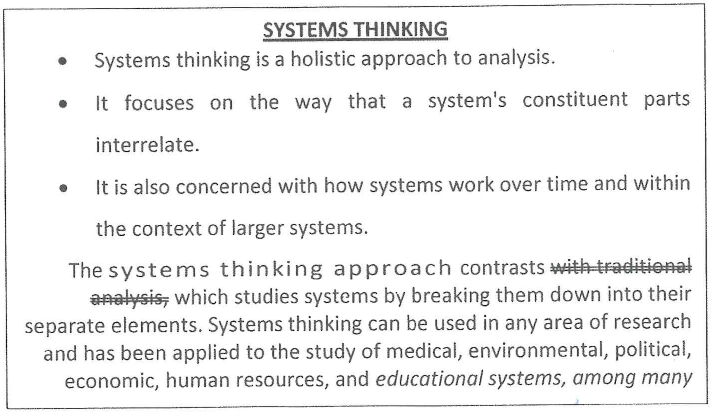
The following is an extract of a word processing document. Use it to answer the questions that follow. Identify each of the following types of formats that have been applied in the document: (i) character formats; (ii) paragraph formats. (4 marks)
Answer
| Type | Visible examples |
|---|---|
| Character formats | Bold and underlined heading; strikethrough on “with traditional analysis”; italics in the closing phrase; expanded character spacing in “The systems thinking approach”. |
| Paragraph formats | Bulleted paragraphs and justified paragraph alignment. |
Question 5(a)
Outline two methods that could be used to sort data in a spreadsheet program. (2 marks)
Answer
- Ascending order, such as A to Z, smallest to largest or oldest to newest.
- Descending order, such as Z to A, largest to smallest or newest to oldest.
Question 5(b)
Explain the function of each of the following components as used in computer networks: (i) router; (ii) hub. (4 marks)
Answer
- Router: forwards packets between different networks using network addresses and routing information to choose an appropriate next hop.
- Hub: connects devices within a shared network segment and repeats an incoming signal to its other ports, without selectively forwarding by destination address.
Question 5(c)
Explain two reasons that would necessitate a business organization to advertise their products through the internet. (4 marks)
Answer
- Reach: online advertising can reach customers beyond the business’s immediate physical area and target relevant audiences.
- Convenient interaction and measurement: customers can view product details and respond promptly, while the business can track enquiries and campaign performance.
Question 5(d)
With the aid of a block diagram, describe a central processing unit of a computer system. (5 marks)
Answer
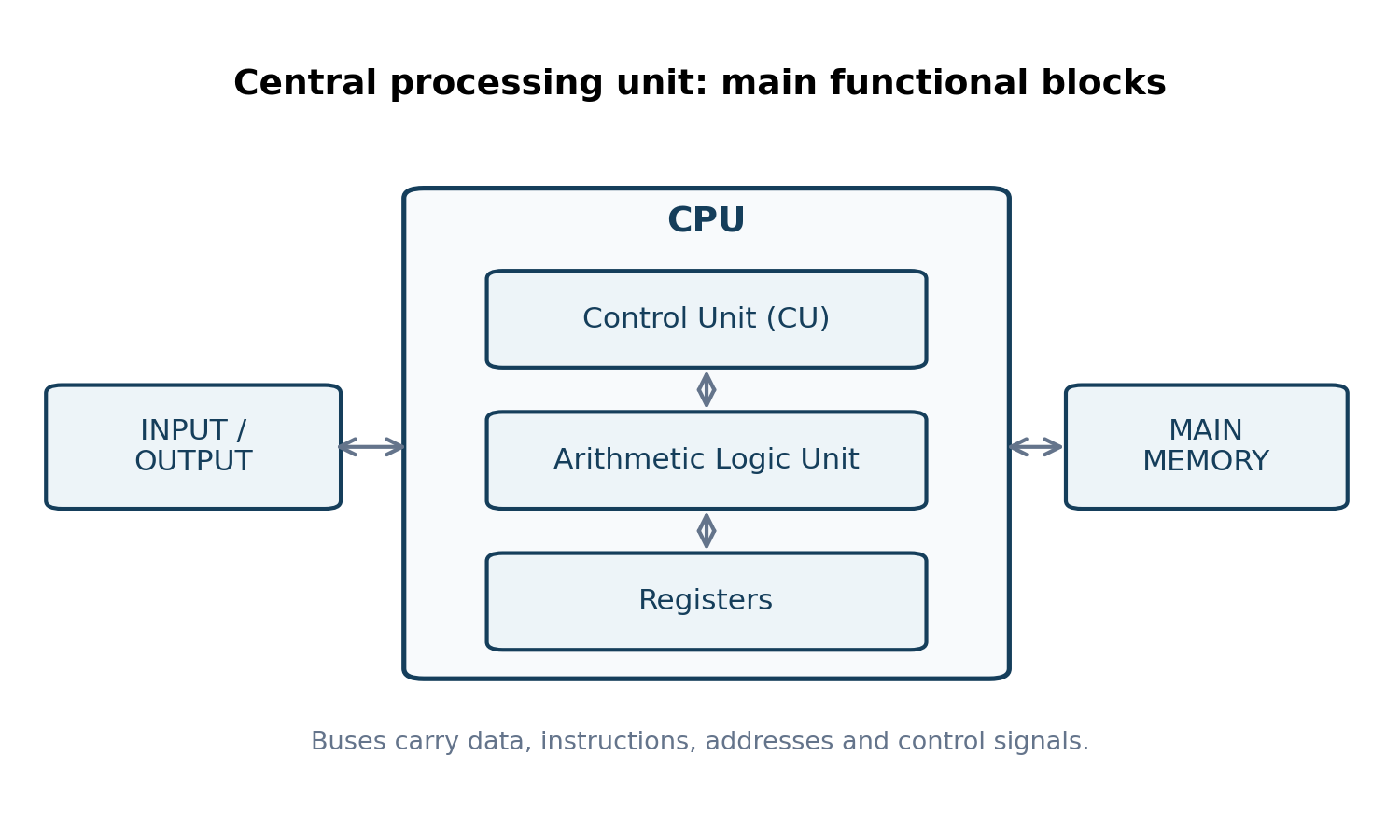
- Control Unit (CU): fetches and decodes instructions and coordinates their execution by directing other components.
- Arithmetic Logic Unit (ALU): performs arithmetic calculations and logical comparisons.
- Registers: small, very fast storage locations within the CPU that hold current instructions, addresses, operands and intermediate results.
- Buses carry data, addresses and control signals between the CPU, main memory and input/output components.
Question 6(a)
Outline the function of each of the following features in a word processing program: (i) zoom controls; (ii) rulers. (2 marks)
Answer
- Zoom controls enlarge or reduce the on-screen view without changing the actual printed size of the content.
- Rulers help set or inspect margins, paragraph indents and tab positions.
Question 6(b)
Explain each of the following features as used in presentation programs: (i) placeholder; (ii) animation effect. (4 marks)
Answer
- Placeholder: a preformatted container on a slide layout for text or other content such as a picture, chart or table.
- Animation effect: an effect applied to an object to control how it appears, moves, receives emphasis or disappears during a presentation.
Question 6(c)
Outline three logical data security measures an organization could put in place to ensure that their information is secure. (3 marks)
Answer
- Authenticate users with strong account credentials and appropriate multi-factor authentication.
- Apply access permissions so users can only read or change information required for their roles.
- Encrypt sensitive data and protect the keys so unauthorised parties cannot readily interpret it.
Question 6(d)
An organization opted to use off-the-shelf application software for their operations. Explain three advantages they are likely to gain from using this software. (6 marks)
Answer
- Lower development cost: the cost of creating the product is shared across many customers instead of borne by one organisation.
- Quick availability: an existing package can normally be acquired and configured sooner than a new custom system can be developed.
- Established support: documentation, updates, training and experience from a wider user base can assist operation and troubleshooting.