Information Communication Technology Theory — July 2020
Source: INFORMATION COMMUNICATION TECHNOLOGY (THEORY) JULY 2020 .pdf | Paper code: 2912/103A; 2918/103A
Question 1(a)
Outline four computer mouse skills a student is likely to use while working on a word processing document. (4 marks)
Answer
- Pointing.
- Single clicking.
- Double clicking.
- Dragging and dropping.
Question 1(b)(i)
Describe a magnetic card as used in computer systems. (2 marks)
Answer
- A magnetic card contains a magnetisable stripe that stores encoded data.
- A compatible reader detects the stored pattern and supplies the data to the computer system.
Question 1(b)(ii)
State two areas where magnetic cards could be used. (2 marks)
Answer
- Payment or banking cards using magnetic stripes.
- Access-control or identification systems using compatible stripe cards.
Question 1(c)
Alice intends to use microcomputers to assist her in teaching practical lessons. Outline four types of such computers. (4 marks)
Answer
- Desktop computer.
- Laptop computer.
- Tablet computer.
- Handheld computer or smartphone.
Question 1(d)
Sam was advised to install a web browser to enable him to surf the Internet. List six examples of such software he could install. (3 marks)
Answer
- Mozilla Firefox.
- Google Chrome.
- Microsoft Edge.
- Apple Safari.
- Opera.
- Brave. Availability depends on the device and operating system.
Question 2(a)
Outline three circumstances that would necessitate the use of a computer voice input device. (3 marks)
Answer
- When a user cannot conveniently operate a keyboard because of an accessibility need.
- When hands-free entry is needed during another task.
- When dictation or spoken interaction is more suitable than typing.
Question 2(b)
Describe each of the following computer network devices: (i) switch; (ii) bridge. (4 marks)
Answer
- Switch: connects devices on a local network and normally forwards Ethernet frames according to learned MAC addresses.
- Bridge: connects network segments and filters or forwards frames between them, usually at the data-link layer.
Question 2(c)
Joyce intends to acquire a Visual Display Unit (VDU) for her computer. Outline four factors she should consider before the acquisition. (4 marks)
Answer
- Screen size and resolution.
- Compatibility and available connection ports.
- Display quality and suitability for the work.
- Cost, energy use and support.
Question 2(d)
Distinguish between a printer and a plotter as used in computers. (4 marks)
Answer
| Printer | Plotter |
|---|---|
| Produces hard-copy text and graphics on a physical medium. | Traditionally produces precise line drawings by moving pens; the term also commonly covers large-format technical output devices. |
| Commonly used for routine documents and images. | Commonly used for engineering plans, maps and other large, accurately scaled drawings. |
Question 3(a)
Outline three slide format options that could be applied during the printing of a presentation document. (3 marks)
Answer
- Full-page slides.
- Handouts with multiple slides per page.
- Notes pages containing a slide and its speaker notes.
Question 3(b)
Describe each of the following Operating System features: (i) Graphical User Interface; (ii) Menu Driven Interface. (4 marks)
Answer
- Graphical User Interface: lets users interact through graphical elements such as windows, icons and controls.
- Menu Driven Interface: presents lists of available commands or options from which the user makes selections.
Question 3(c)
Linda intends to acquire a word processing software. List eight factors she could consider during the selection of the software. (4 marks)
Answer
- Required features.
- Operating-system compatibility.
- Compatibility with existing document formats.
- Ease of use.
- Purchase or subscription cost.
- Hardware requirements.
- Technical support and updates.
- Accessibility and language support.
Question 3(d)
A certain institution connected their computers to a Wide Area Network and experienced some passive network threats. Outline four such threats. (4 marks)
Answer
- Passive packet sniffing to read unprotected message content.
- Wiretapping a communications link.
- Eavesdropping on wireless transmissions.
- Traffic analysis that reveals communication patterns or metadata. These are examples of passive observation; the categories can overlap, and they do not involve altering the traffic.
Question 4(a)
Outline four file organization methods that are used in computer systems. (4 marks)
Answer
- Serial organisation.
- Sequential organisation.
- Indexed-sequential organisation.
- Direct or random organisation.
Question 4(b)
Explain the function of each of the following word processing features: (i) status bar; (ii) menu bar. (4 marks)
Answer
- Status bar: displays information about the document or current working state, such as page number or word count.
- Menu bar: groups commands into menus through which document and application operations can be selected.
Question 4(c)
Distinguish between line spacing and paragraph spacing as used in a word processing document. (4 marks)
Answer
| Line spacing | Paragraph spacing |
|---|---|
| Controls the vertical distance between lines within a paragraph. | Controls the extra space before or after a paragraph. |
| Examples include single, 1.5-line or double spacing. | Typically specified as a before/after value, often measured in points. |
Question 4(d)
Table 1 was created using a word processing program. Use it to answer the question that follows. State three word processing features used to achieve the results after formatting the text. (3 marks)
| Before Formatting text | After Formatting text |
|---|---|
| T2 | T2 |
| A2 | A2 |
| An object is said to be recursive if it partially consists of itself. Recursion is encountered not only in mathematics, but also in daily life. | An object is said to be recursive if it partially consists of itself. Recursion is encountered not only in mathematics, but also in daily life. |
Answer
- Superscript: raises the 2 in T².
- Subscript: lowers the 2 in A₂.
- Drop Cap: enlarges the opening A so it extends down beside several lines of the paragraph.
Question 5(a)
Explain two transition sound options that could be applied on a slide during slide show in a presentation. (4 marks)
Answer
- A selected sound: plays an available or supported imported audio effect when the slide transition occurs.
- No sound: applies the transition without an audio effect. Where available, Stop Previous Sound ends a sound continuing from the preceding slide.
Question 5(b)
Miriam was advised to use a mail merge feature while communicating to the institutes’ customers. Outline three advantages of using this feature. (3 marks)
Answer
- Produces personalised documents efficiently.
- Maintains consistent common wording and layout.
- Reduces repeated typing of recipient details.
Question 5(c)
Jayden created a database for the organization he works for. Outline four database objects he could have included in this database. (4 marks)
Answer
- Tables.
- Queries.
- Forms.
- Reports.
Question 5(d)
Explain two reasons that would compel an organization to connect their computers to an uninterruptible power supply device. (4 marks)
Answer
- Provides temporary power during an outage, allowing work to be saved and systems shut down safely.
- Suitable UPS equipment can help protect against specified supply disturbances, reducing disruption and some electrical risks.
Question 6(a)
Outline four types of charts that could be created using spreadsheet programs. (4 marks)
Answer
- Column chart.
- Bar chart.
- Line chart.
- Pie chart.
Question 6(b)
Differentiate between a computer virus and a computer worm as used in computers. (4 marks)
Answer
| Virus | Worm |
|---|---|
| Typically attaches to or infects a host file or other executable content. | Is a self-contained malicious program capable of replication. |
| Commonly spreads when infected content executes. | Can propagate between systems, often through network mechanisms, without needing the same kind of host-file attachment. |
Question 6(c)
A certain bank integrated the use of computer networks for its operations. Explain two benefits the bank would realise from this move. (4 marks)
Answer
- Branches can exchange authorised transaction and account information more quickly, improving coordination.
- Shared systems and services reduce unnecessary duplication and support consistent customer service across branches.
Question 6(d)
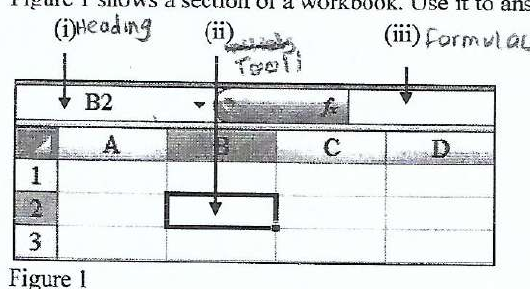
Figure 1 shows a section of a workbook. Use it to answer the question that follows. Outline the function of each of the parts labelled (i), (ii) and (iii). (3 marks)
Answer
- (i) Name Box: displays the active cell reference, here B2, and can be used to navigate to or name a range.
- (ii) Active cell: the currently selected cell where an entry or operation will be applied.
- (iii) Formula Bar: displays and allows editing of the active cell’s contents or formula.