Information Communication Technology Theory — November 2021
Source: 04 INFORMATION COMMUNICATION TECHNOLOGY I (THEORY) NOV 2021 _compressed.pdf | Paper code: 2912/103A; 2918/103A
Question 1(a)
State three features that were introduced in the 3rd generation computers. (3 marks)
Answer
- Use of integrated circuits.
- Operating systems supporting multiprogramming.
- More developed time-sharing capabilities, characteristic of this generation.
Question 1(b)
Explain two ways in which an organization would use information communication technology to communicate to its customers. (4 marks)
Answer
- Email sends written messages, quotations and attachments directly to customers.
- A website or customer-service platform publishes information and provides a channel for enquiries and feedback.
Question 1(c)
A company intends to acquire a printer for their daily use. Outline four criteria that they should consider during the selection of this device. (4 marks)
Answer
- Required print quality.
- Printing speed and expected workload.
- Purchase and consumables costs.
- Compatibility, connectivity and maintenance support.
Question 1(d)
Dennis has been tasked with creating a document using a presentation program. State eight slide layouts he could use. (4 marks)
Answer
- Title Slide.
- Title and Content.
- Section Header.
- Two Content.
- Comparison.
- Title Only.
- Blank.
- Content with Caption.
Question 2(a)(i)
Hong Che Company intends to control access to files in their computer systems using authentication method. Explain the term authentication. (2 marks)
Answer
Authentication is the process of verifying a claimed identity, such as confirming that a person signing in is the legitimate holder of the account. Authorisation then determines what that authenticated identity may access.
Question 2(a)(ii)
Explain two ways the organization could implement this method. (4 marks)
Answer
- Knowledge factor: require an account password or PIN known to the legitimate user.
- Possession factor: require an approved security key or authenticator-held credential. Combining independent factors provides stronger authentication than relying on one alone.
Question 2(b)
State the category of computer software that performs each of the following tasks in a computer system, giving an example in each case: (i) controlling the working of peripheral devices; (ii) analyzes, configures, secures, optimizes and maintain the system; (iii) allows users to accomplish one or more tasks; (iv) used to create, debug, maintain, or otherwise support other programs and applications. (6 marks)
Answer
- (i) Device driver, for example a printer driver.
- (ii) Utility software, for example a backup utility.
- (iii) Application software, for example a word processor.
- (iv) Programming or development software, for example a compiler or an integrated development environment.
Question 2(c)
Outline three differences between magnetic and optic storage media as used in computer systems. (3 marks)
Answer
| Basis | Magnetic media | Optical media |
|---|---|---|
| Storage principle | Uses magnetised regions. | Uses optically readable marks or changes. |
| Reading mechanism | Uses a magnetic read/write head. | Uses a laser and optical detection. |
| Typical forms and handling | Includes hard disks and magnetic tape; strong magnetic fields can be harmful. | Includes CDs, DVDs and Blu-ray discs; scratches or damage to the optical surface can prevent reading. |
Question 3(a)
State six functions of the computer operating system. (3 marks)
Answer
- Process management.
- Memory management.
- File management.
- Device management.
- Providing a user interface.
- Managing user access and system protection.
Question 3(b)
Explain each of the following terms as used in the Internet: (i) domain; (ii) hypertext link. (4 marks)
Answer
- Domain: a named part of the Domain Name System namespace, such as example.com, used in identifying internet resources and services.
- Hypertext link: a selectable reference that leads to another resource or location, such as a page, document or section.
Question 3(c)
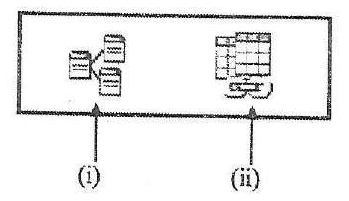
Figure 1 shows features in a database program. Use it to answer the question that follows. Explain the function of the features labelled (i) and (ii). (4 marks)
Answer
- (i) Relationships: opens the tool used to define and manage links between related tables.
- (ii) Compact and Repair Database: performs the database maintenance operation that reclaims unused space and attempts to repair certain database-file problems.
Question 3(d)
Joan has been tasked with the design of a Local Area Network for JuanHo Company. Outline four types of network topologies he is likely to implement. (4 marks)
Answer
- Star.
- Bus.
- Ring.
- Tree.
Question 4(a)
State six data processing modes that may be used in computer systems. (3 marks)
Answer
- Batch processing.
- Real-time processing.
- Online processing.
- Distributed processing.
- Multiprocessing.
- Time-sharing. These terms describe overlapping aspects of processing arrangements.
Question 4(b)
Explain one circumstance that would necessitate the use of each of the following view features in a presentation program: (i) slide sorter; (ii) slide master. (4 marks)
Answer
- Slide Sorter: when the presenter needs an overview for rearranging slides or reviewing their sequence.
- Slide Master: when a consistent design, font, background or repeated element must be applied across related slides.
Question 4(c)
James intends to use the mail merge feature to send customized letters to his clients. Explain two documents he should prepare to achieve this. (4 marks)
Answer
- Main document: contains the common letter and merge fields.
- Data source: contains the recipient records, with fields such as name and address that supply personalised values.
Question 4(d)
Distinguish between Autofill and AutoFormat features as used in spreadsheet applications. (4 marks)
Answer
| Autofill | AutoFormat |
|---|---|
| Extends a series or copies values and formulas into adjacent cells. | Applies a predefined set of presentation formats to a selected range or table. |
| Example: continuing Monday, Tuesday, Wednesday or copying a formula down a column. | Example: applying coordinated headings, number formats, borders and shading. |
Question 5(a)
Outline three ways that may be used to format the page background of a document created using a word processing application. (3 marks)
Answer
- Apply a page colour.
- Insert a watermark.
- Add page borders.
Question 5(b)
Explain two reasons for using the print preview feature in a word processing application. (4 marks)
Answer
- Checks the appearance of pages, margins and page breaks before printing.
- Helps identify layout errors early, reducing wasted paper, ink and printing time.
Question 5(c)
Figure 2 is a spreadsheet extract showing the status of goods supplied and action to be taken by a wholesaler. Use it to answer the question that follows. Use the If function to write a formula in cell C3 that would display the text “No Action” if the delivery status of the Apples is delivered or, the text “Action to be taken” if delivery status is otherwise. (4 marks)
| Row | A: Product | B: Delivery Status | C: Action Required |
|---|---|---|---|
| 1 | Product | Delivery Status | Action Required |
| 2 | Bananas | Delivered | |
| 3 | Apples | In-transit | |
| 4 | Oranges | Delivered |
Answer
| Cell / step | Entry or result |
|---|---|
| C3 formula | =IF(B3="Delivered","No Action","Action to be taken") |
| Test | Compare B3 with the text "Delivered". |
| Supplied B3 value | In-transit |
| Result for Apples | Action to be taken |
Ordinary Excel text equality is not case-sensitive. Keep the original B3 reference because the question concerns the Apples row.
Question 5(d)
Karol opted to use templates when creating a document in a presentation program. Explain two advantages he would get by using this feature. (4 marks)
Answer
- Saves preparation time because the initial design and layouts are already available.
- Provides a consistent appearance across slides, making the presentation easier to follow.
Question 6(a)
Describe a personal area computer network (PAN) giving two examples of technologies that could be used for its connectivity. (3 marks)
Answer
- A PAN connects devices within a person’s immediate working area, such as a phone, laptop and headset.
- Bluetooth can provide short-range wireless PAN connectivity.
- USB can connect personal devices through a wired link.
Question 6(b)(i)
Explain each of the following commands as used in presentation programs: (i) hide slides. (2 marks)
Answer
- Hide Slide excludes the selected slide from the normal slide-show sequence.
- The slide remains in the presentation and can be unhidden or deliberately accessed.
Question 6(b)(ii)
Explain each of the following commands as used in presentation programs: (ii) delete slides. (2 marks)
Answer
- Delete Slide removes the selected slide from the presentation.
- Unlike hiding, the slide is no longer retained as part of the presentation unless restored, for example through Undo.
Question 6(c)
Allan prepared teaching notes on the topic file access methods. Explain two methods he could have included in the notes. (4 marks)
Answer
- Sequential access: records are read in sequence until the required item is reached.
- Direct or random access: the system uses a record address, key or index-supported location to reach the required item without reading every preceding record.
Question 6(d)
John has been tasked with preparing a data backup plan for an organization. Explain two components that he should include in this plan. (4 marks)
Answer
- Backup scope and schedule: identify the data and systems to protect, the backup method, frequency and responsible persons.
- Storage and recovery arrangements: specify secure storage, retention, access controls and regular restoration tests so the copies can actually be used.