Level 6 — Module I — Operating Systems — Jul/Aug 2026
Module I • Level 6 • July/August 2026 • Written assessment
Work through each question before checking the answer. These revision answers are prepared for learners; they are not an official marking scheme.
Question 1
Answer
- Display CPU, memory, disk and network utilisation to reveal bottlenecks.
- Identify processes consuming excessive resources and provide evidence for adjusting workloads or investigating faults.
Question 2
Answer
- Hardware compatibility and minimum requirements.
- Application and peripheral-driver compatibility.
- Backups and a plan for preserving/restoring user data.
- Correct edition, licence, trusted installation media and installation/partitioning method.
Question 3
Answer
- Single-user OS.
- Multi-user OS.
- Real-time OS where responses must meet specified deadlines.
Question 4
Answer
- Assign file-system permissions to authorised users/groups.
- Encrypt sensitive files and protect the associated account/key.
Question 5
Answer
- Generates timer events used for scheduling, time slices and timeouts.
- Maintains time information used for timestamps, elapsed-time measurement and system timekeeping.
Question 6
Answer
- Clear heading styles and a consistent font size.
- Appropriate paragraph spacing and line spacing.
- Suitable alignment, margins and indentation.
- Bullets/numbering or tables for structured information.
Question 7
Answer
- Choose an appropriate provider/address for the intended use.
- Use a strong unique password and configure supported recovery and multifactor authentication.
Question 8
Answer
- Seek/positioning time for mechanical disks.
- Rotational latency for mechanical disks.
- Transfer throughput, including interface bandwidth and workload. SSDs have no mechanical seek or rotational delay but still have access latency.
Question 9
Answer
- Allocates and releases storage blocks.
- Creates/manages file systems and directories.
- Tracks free and used disk space.
- Schedules I/O and manages caching/buffering; it can also provide partition/volume tools.
Question 10
Answer
- Hardware/storage infrastructure.
- DBMS software and applications.
- Data and database metadata.
- People/procedures, including administrators, developers and users.
Question 11
Answer
- SUM adds numeric values in a range.
- AVERAGE computes their arithmetic mean.
- IF selects a result according to a logical condition.
Question 12
Answer
A driver is OS software translating system requests into device-specific operations. A controller is hardware/firmware operating the peripheral and its data interface. The driver communicates with the controller through documented registers or protocols.
Question 13
Answer
- Keep each slide focused on a clear message.
- Use readable text sizes, good contrast and a consistent layout.
- Use relevant graphics/charts and avoid crowded slides.
- Arrange a logical sequence and rehearse transitions/timing.
A master file directory contains an entry for each user. Each user has a user file directory containing their files. The path identifies the user directory and file, allowing different users to use the same filename without a collision; deeper subdirectories belong to a more general hierarchical structure.
- Single-user systems serve one user at a time.
- Multi-user/time-sharing systems support several users and allocate resources among them.
- Real-time systems emphasise meeting deadlines for monitoring/control workloads.
Question 14
Answer
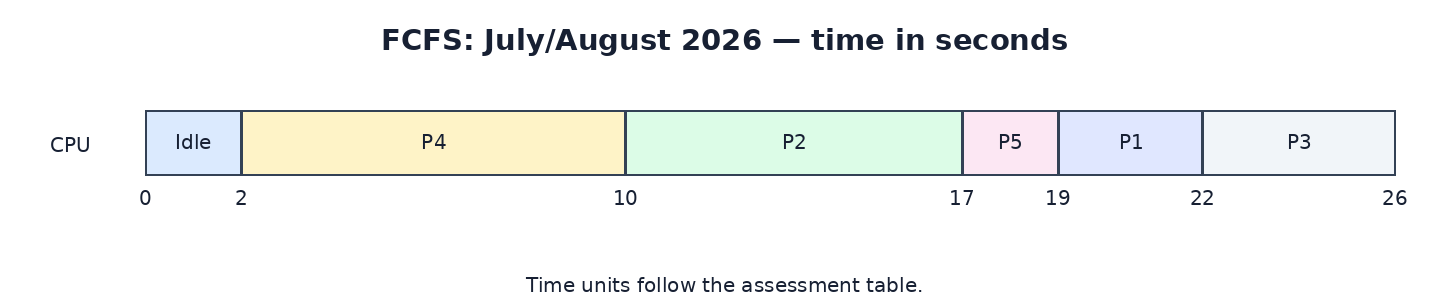
- Order by arrival: P4, P2, P5, P1, P3. The CPU is idle from 0 to 2 s.
- Start/finish intervals: P4 2–10, P2 10–17, P5 17–19, P1 19–22, P3 22–26.
- Waiting time = start − arrival. Turnaround = finish − arrival.
- Average waiting time = (14 + 7 + 16 + 0 + 13) / 5 = 10 s.
- Average turnaround time = (17 + 14 + 20 + 8 + 15) / 5 = 14.8 s.
| Process | Arrival | Burst | Start | Finish | Wait | Turnaround |
|---|---|---|---|---|---|---|
| P1 | 5 | 3 | 19 | 22 | 14 | 17 |
| P2 | 3 | 7 | 10 | 17 | 7 | 14 |
| P3 | 6 | 4 | 22 | 26 | 16 | 20 |
| P4 | 2 | 8 | 2 | 10 | 0 | 8 |
| P5 | 4 | 2 | 17 | 19 | 13 | 15 |
Question 15
Answer
Paging divides virtual memory into fixed-size pages and RAM into frames. A page table maps a process’s virtual pages to physical frames. Demand paging loads a required page when a page fault occurs. This supports isolation and programs larger than available RAM, but frequent page faults can reduce performance or cause thrashing.
- Increase usable RAM or reduce the number of active applications so the working set fits in memory.
- Use effective page-replacement/locality policies and avoid unnecessary memory allocation; fast backing storage reduces the cost of unavoidable faults.
- Creates and terminates processes.
- Maintains process control blocks and execution state.
- Schedules CPU use and performs context switches.
- Coordinates IPC and synchronisation.
- Allocates/protects resources and handles blocked processes, exceptions and deadlock issues.
Question 16
Answer

- New: process creation.
- Ready: runnable, waiting for CPU.
- Running: executing instructions.
- Waiting/Blocked: awaiting I/O or another event.
- Terminated: finished or stopped.
- Select an eligible suspended process when memory pressure requires space.
- Save its context and memory image to backing storage.
- Release its RAM frames and record where the saved image is located.
- When it becomes eligible and memory is available, restore the image and update address mappings.
- Place it in the ready queue; the scheduler later restores its CPU context. Modern systems often page individual pages rather than swap an entire process.