Module I — Operating Systems — Nov/Dec 2025
Module I • Level not stated • November/December 2025 • Written assessment
Work through each question before checking the answer. These revision answers are prepared for learners; they are not an official marking scheme.
Question 1
Answer
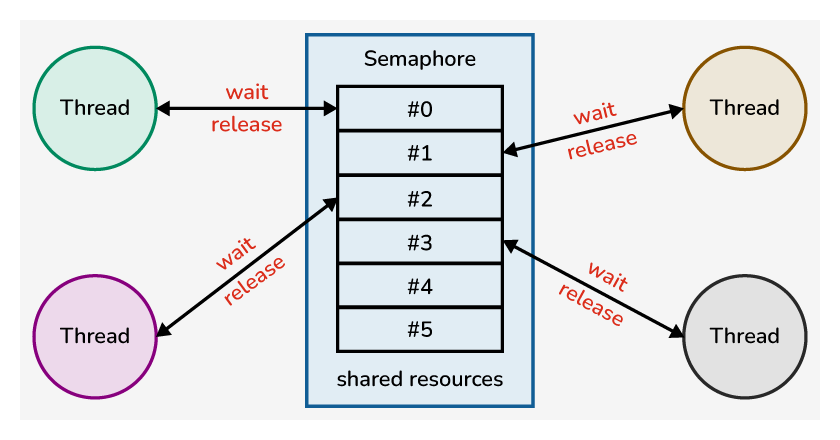
The diagram shows semaphore-based synchronisation.
- Incorrect wait/release order can lead to deadlock.
- An unfair scheduling policy can leave a thread starving indefinitely.
- Priority inversion can occur when a high-priority thread waits for a resource held by a lower-priority thread.
Question 2
Answer
- Keeps a small set of essential functions, such as scheduling, address-space management and IPC, in kernel mode.
- Many services, such as drivers or file servers, run as separate user-space processes.
- Services communicate through message passing.
- Isolation improves fault containment and modularity, though message/context-switch overhead can affect performance.
Question 3
Answer
- Use Settings → Windows Update to check for and install supported updates.
- Install an applicable official Microsoft Update Catalog package or use the organisation’s managed update service.
Question 4
Answer

- New: the OS creates the process and its control structures.
- Ready: it can run but is waiting for a CPU allocation.
- Running: its instructions execute on a processor.
- Terminated: it finishes or is stopped and its resources are reclaimed. The full common model also includes Waiting/Blocked.
Question 5
Answer
- The selected volume becomes smaller.
- Unallocated space is created after the volume where the shrink operation permits.
- That space can be used for another volume or a suitable extension; shrinking does not automatically create or format a new partition. Unmovable data can limit the shrink size.
Question 6
Answer
- Arrange data with meaningful headings in a range.
- Select the headings and data.
- Use Insert and choose a suitable chart type.
- Check the data series and add a clear title, axis labels/units and legend; adjust the layout.
Question 7
Answer
- Restrict file access with least-privilege user/group permissions.
- Use strong authentication and multifactor authentication for accounts that support it.
- Encrypt sensitive stored files and protect the encryption keys.
- Maintain protected backups and audit access logs to detect unauthorised use.
Question 8
Answer
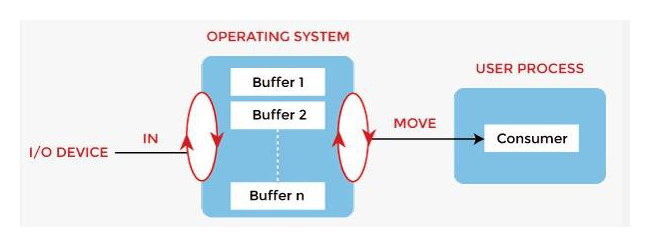
Buffering temporarily holds data to accommodate differences in producer and consumer speed.
- Keyboard input.
- Disk or SSD data transfers.
- Network-interface receive/transmit operations.
- Audio input/output streams.
Question 9
Answer
- BCC (blind carbon copy) sends a copy to recipients whose addresses are not shown to other recipients in that message.
- Spam is unsolicited bulk or unwanted messaging, commonly including advertising or fraudulent messages.
Question 10
Answer
- Identify the GPU, Windows version and architecture.
- Find a compatible signed driver through the computer/GPU manufacturer’s official support channel or Windows Update.
- Install the approved update using the provided installer or Device Manager’s update procedure.
- Restart if required and verify the driver version and graphics application; retain a rollback option if problems appear.
Question 11
Answer
- Clients request services from separate server processes.
- Communication uses defined IPC/message interfaces.
- Services such as file management can be separated from the kernel and from one another.
- The modular separation supports maintenance and fault isolation; it can also be extended to remote services where designed.
Question 12
Answer
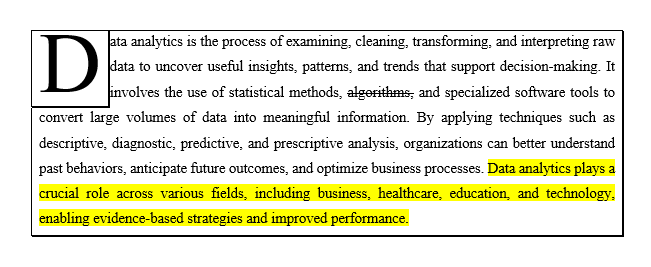
- Drop cap: the enlarged initial D spans several lines.
- Text highlighting: selected sentences have a yellow background.
- Border: a rectangular line encloses the paragraph.
- Prevent hold-and-wait: require a process to obtain all needed resources together or release held resources before requesting more.
- Break circular wait: impose a consistent global order for acquiring resources.
- Allow preemption where the resource permits it: reclaim/retry a held resource when another required resource cannot be obtained.
- Fast random access with no mechanical seek delay.
- Better resistance to shock because there are no moving read/write heads.
- Lower operating noise.
- Often lower energy consumption and smaller physical size. SSDs do not make every HDD application obsolete; cost, capacity and workload still matter.
Question 13
Answer
| Process | Arrival | Burst | Priority |
|---|---|---|---|
| P0 | 0 | 6 | 1 |
| P1 | 1 | 4 | 2 |
| P2 | 2 | 9 | 1 |
| P3 | 3 | 7 | 3 |
Use non-preemptive SJF and priority; lower priority number means higher priority, and equal priorities use arrival order. The printed “service time” column is inconsistent with these arrivals/bursts; compute start times from the data above. For round robin, arrivals at a quantum boundary enter before the running process is requeued.
| Algorithm | Execution intervals |
|---|---|
| FCFS | P0: 0–6; P1: 6–10; P2: 10–19; P3: 19–26 |
| SJF | P0: 0–6; P1: 6–10; P3: 10–17; P2: 17–26 |
| Priority | P0: 0–6; P2: 6–15; P1: 15–19; P3: 19–26 |
| Round robin, q=3 | P0: 0–3; P1: 3–6; P2: 6–9; P3: 9–12; P0: 12–15; P1: 15–16; P2: 16–19; P3: 19–22; P2: 22–25; P3: 25–26 |

- Normal view: create and edit slides and notes.
- Slide Sorter: review the deck as thumbnails and rearrange slides.
- Slide Show: present the slides full screen.
- Batch OS: executes queued jobs with little interactive intervention.
- Time-sharing/multitasking OS: shares processor time among active tasks/users.
- Real-time OS: schedules work to meet specified timing deadlines.
Question 14
Answer
- Sequential: read or write records in order from the current position.
- Direct/random: jump to a specified offset or record.
- Indexed: use an index to locate the required record or block.
- Resolve a duplicate-name conflict when saving or copying into the same directory.
- Remove invalid characters or comply with file-system/path naming limits.
- Give a meaningful name or correct a mistaken name; changing an extension alone does not convert a file format.
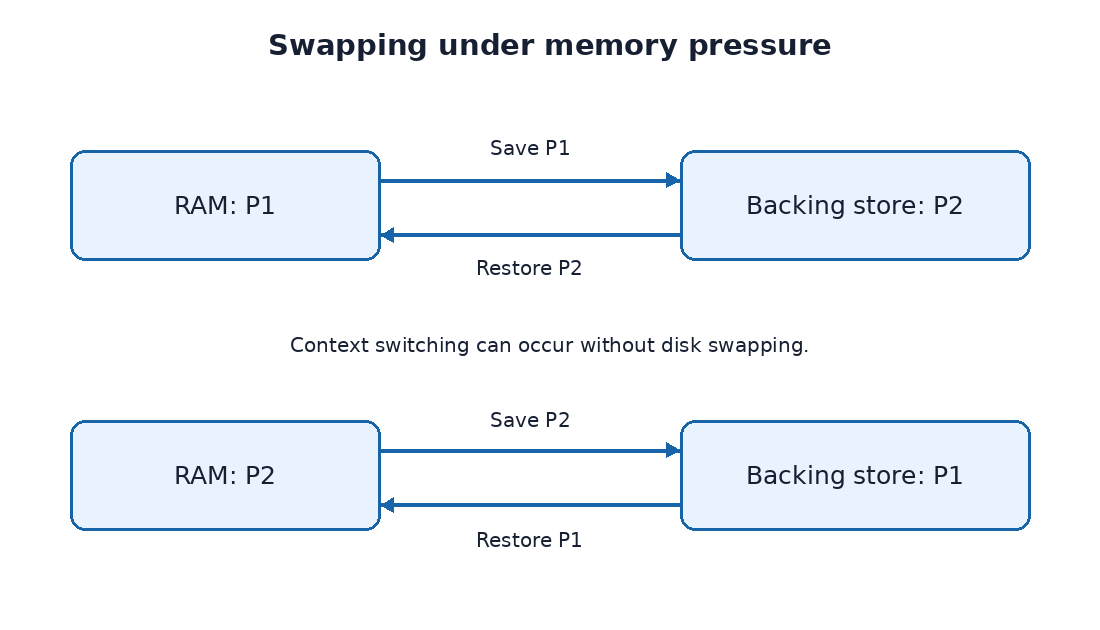
Swapping saves a suspended process’s memory image to backing storage and restores it when needed. If P1 is swapped out to make room for P2, retain P1’s process state and address-space information; later restore P1 before dispatching it. Round robin does not require a disk swap at every quantum: when both processes fit in RAM, normal context switching is sufficient.
Question 15
Answer
- DOCX: editable Word document containing formatted text, tables and related content.
- XLSX: Excel workbook containing worksheets, data, formulas and charts.
- PPTX: editable PowerPoint presentation containing slides.
- ACCDB: Access database containing tables, queries, forms and reports.
| Aspect | Process | Thread |
|---|---|---|
| Address space | Typically has its own protected address space | Shares its process address space with sibling threads |
| Resources | Owns resources such as handles and memory mappings | Shares many process resources but has its own stack and registers |
| Creation/switching | Usually more expensive | Usually less overhead within one process |
| Communication/isolation | Uses IPC; one process can often fail without corrupting another | Shared memory simplifies communication but requires synchronisation |
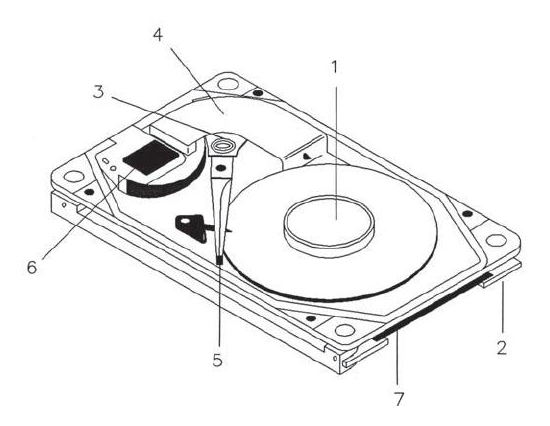
- 5 — Read/write head: reads and writes magnetic information on the platter; the arm positions it over the selected track.
- 7 — Controller/circuit board: controls the drive electronics, motor and data interface, and coordinates transfers with the host.